Glancio
See it. Handle it.

Stop explaining your screen to AI. Let Glancio handle it.

Select anything on your screen.
Turn it into briefs, replies, and launch packs — instantly.

First 100 pioneers lock Founder benefits.

Enlarge
The old way

Your work is already on your screen.
But your AI only sees what you copy into a chat box.

Same loop: switch apps, copy pieces, paste them into AI, explain the missing context, then move the result back into your work.

Copying. Pasting. Explaining.

New hope

What if your screen could see with you?

Glancio lets you select what needs attention. Ask follow-ups right there — or run an Action that turns your selection into finished work.

  • Activated by you
  • Grounded in context
  • Ask in place
  • Run an Action
How it works

Select. Click. From “seeing” to “done.”

One selection. Instant context. Ask follow-ups or click an Action to finish the job.

  1. Press

    Hit AltS to call Glancio over anything on your screen.

  2. Select

    Select a region, a window, or the whole screen.

  3. Ask or Act

    Glancio explains it first. Ask a follow-up, or click an Action.

Magic 1 — one capture, ask or act
Ask

Understand it, in context

Select what you’re looking at. Glancio uses the context around it to explain it in plain words right beside your work. Need more? Ask follow-ups in place — grounded in the same context.

Instant explanation first. Follow-up questions without starting a chatbox.
Act

Run Research, get a finished brief

Click an Action and the same capture becomes a structured deliverable. Not a chat reply — a brief.

Reading a complex paper? Hit Research. Brief done.

Magic 2 — the same loop, more actions
Reply

Buried in an email thread?

Hit Reply. Glancio drafts a response with the thread’s context, ready to send.

Actions

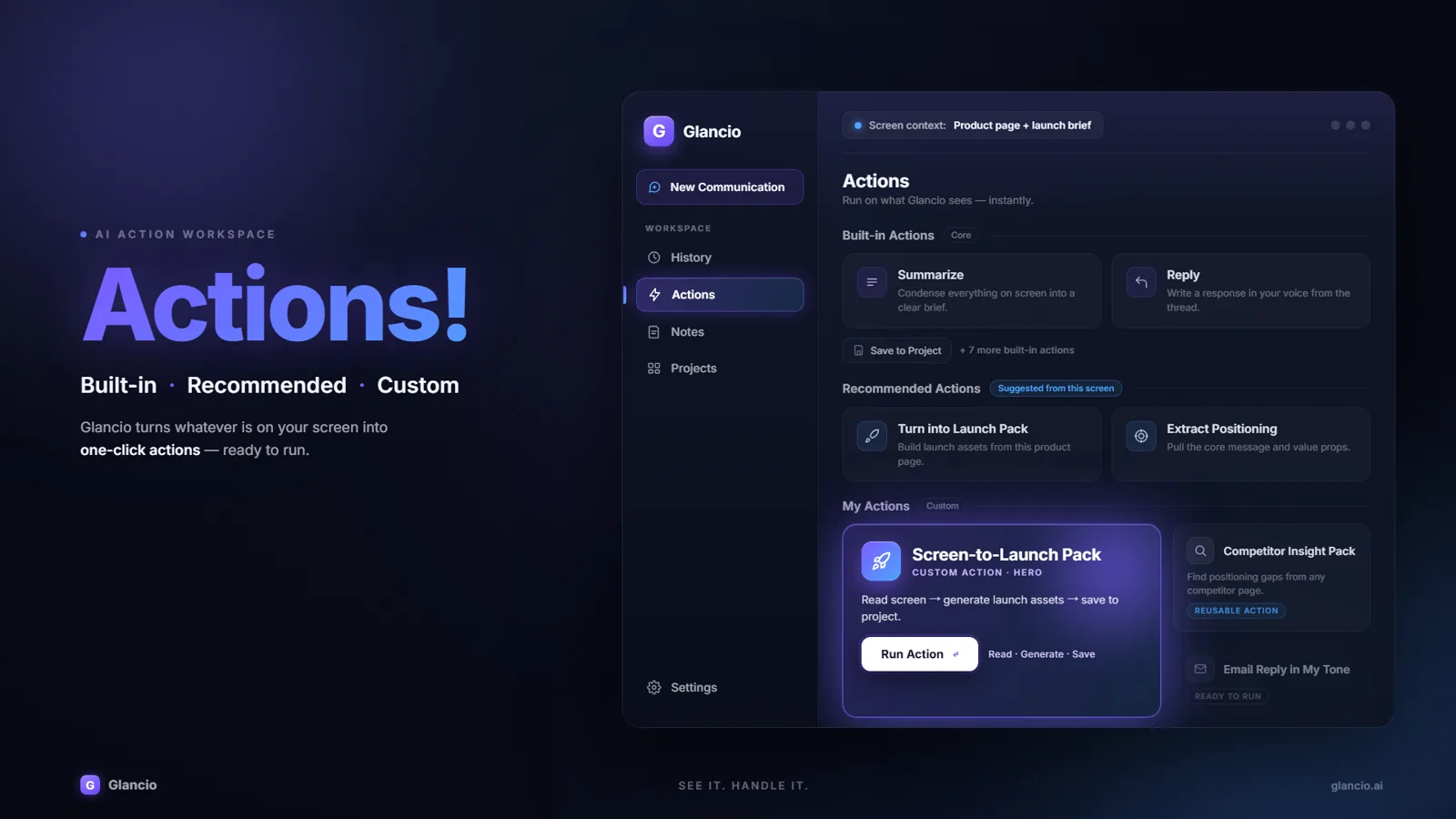
Built-in. Recommended. Build your own.

Start with built-in Actions like Research, Reply, Explain, and Summarize. For work only you do — like watching a competitor launch — build your own Action.

Glancio Actions: Built-in, Recommended, and Custom actions ready to run
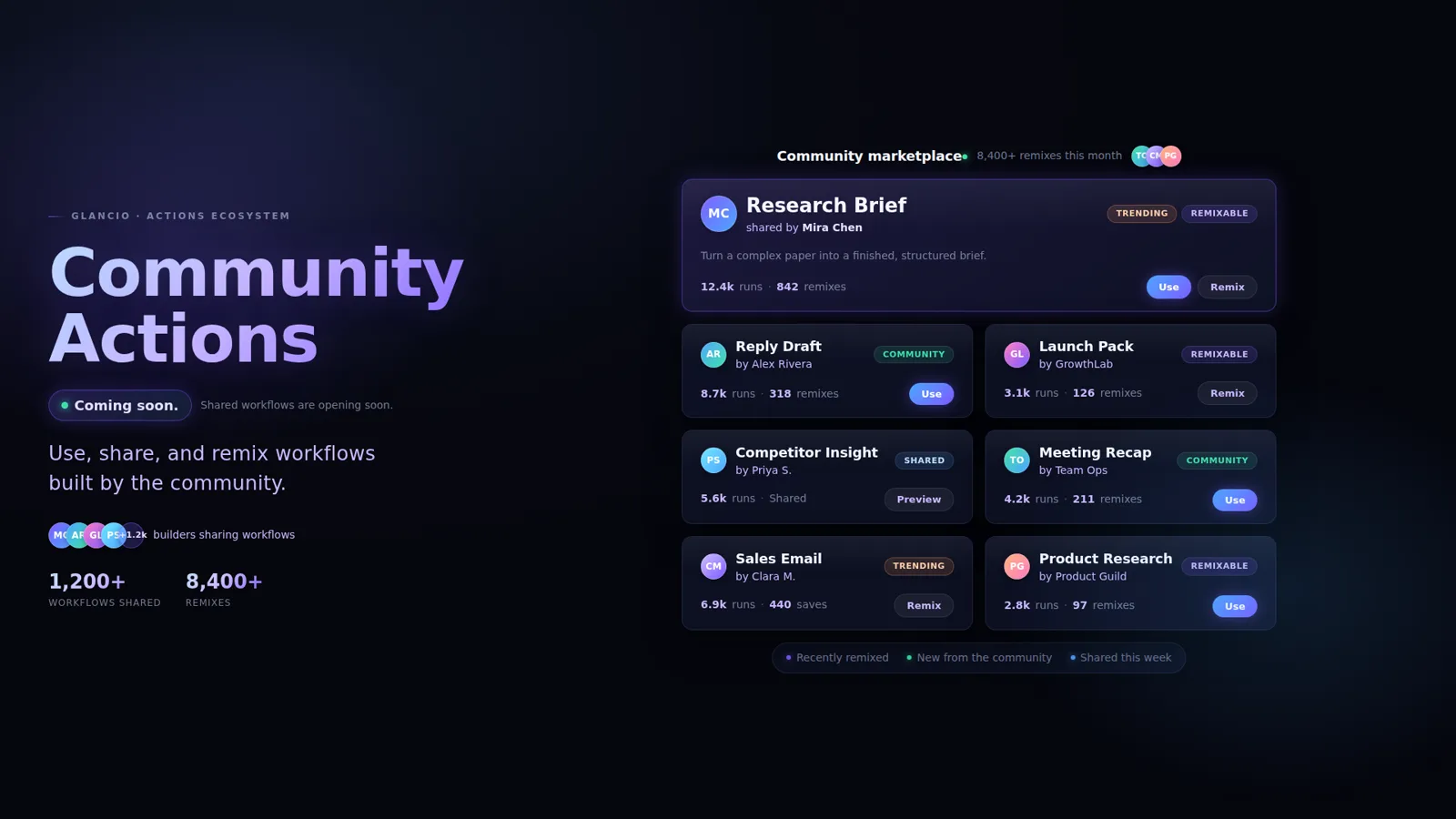
Coming soon Community Actions: a future marketplace of shared, remixable Glancio workflows
Community · Coming soon

One day, the best Actions won’t be ours.

Use, share, and remix workflows built by the community — so the right Action for your job already exists when you need it.

Help shape it · Optional

What problem would you want Glancio to solve for you?

Examples: explain a confusing chart · summarize a PDF section · draft a reply · compare two pages · extract action items

Only if you want us to ask about your idea. This won’t add you to the waitlist.

Pricing preview before launch.

Choose how much work you want Glancio to handle.

Essential

$9/mo

800 credits/mo

For occasional screen-based AI help.

  • Glancio screen overlay
  • Explain, translate, and simplify what you see
  • Basic Reply and Summary Actions
  • 2 Custom Actions
  • Save to Notes
  • 30-day history
  • Standard processing
Most Popular

Pro

$19/mo

2,000 credits/mo

Best for daily knowledge work.

  • Everything in Essential
  • Reply, Summary, Research, and Extract Actions
  • 10 Custom Actions
  • Notes & Projects
  • Webpage and PDF summaries
  • Export to Markdown / PDF
  • 90-day history
  • Early access to new Actions

Power

$39/mo

5,000 credits/mo

For deep research and custom workflows.

  • Everything in Pro
  • Deep Research Actions
  • Long PDF and multi-page context
  • Competitor Insight Actions
  • Launch Text Pack Actions
  • 50 Custom Actions
  • Longer context window
  • Priority processing
  • Advanced exports
  • Higher fair-use limits

Simple screen Actions use fewer credits. Research, long documents, premium models, external APIs, and future media-generation Actions use more. Final pricing, credits, and plan limits may change before public release.

FAQ

Short answers before you join.

Glancio is an AI action layer for the work on your screen. You call it up, select what you’re looking at, and use AI to understand it, ask follow-up questions, or turn it into a useful output.

Press the shortcut, select the screen content you want Glancio to work with, and choose what you need next. Glancio can explain it in plain language, answer follow-up questions in place, or run an Action to create a deliverable.

No. A chatbot waits for you to move your work into a chatbox. Glancio appears where you’re already working, uses the screen context you select, and helps turn it into answers, actions, or finished work.

No — Glancio is not a silent screen watcher. You decide what it works with:

  • Activated by you — it only runs when you press the shortcut
  • Works only on what you select
  • No silent screen monitoring
  • Visible capture state, so you always know when it’s active
  • You control what gets saved, inserted, or exported

Nothing happens until you ask.

Not yet. We’re validating the first version with early users before launch. Join the waitlist if you want early access and want to help shape which Actions matter most.

The $1 reservation is a one-time Founding Pioneer reservation before launch. It is not a subscription and no paid plan starts today. It gives you a place in the Glancio co-creation experiment, with Founder Benefits activating after the official product launch: a digital certificate, Founder-only feedback group, permanent Founder badge, voting influence on the first 3 new features, optional name on the Founding Pioneers wall, a chance for quarterly 1:1 founder calls, and 20% off the core subscription for your first year after launch.

Join the waitlist

See it. Handle it.

Glancio — the AI that turns what you see into a one-click workflow.

First 100 pioneers get Founder Benefits — reserve yours for $1 after joining the waitlist.

Questions? Email hello@glancio.ai.

Early access

Join the Glancio waitlist.

Email only. Everything else stays optional.

“The first AI” refers to Glancio’s intended product category and positioning, not a claim of verified market ranking.